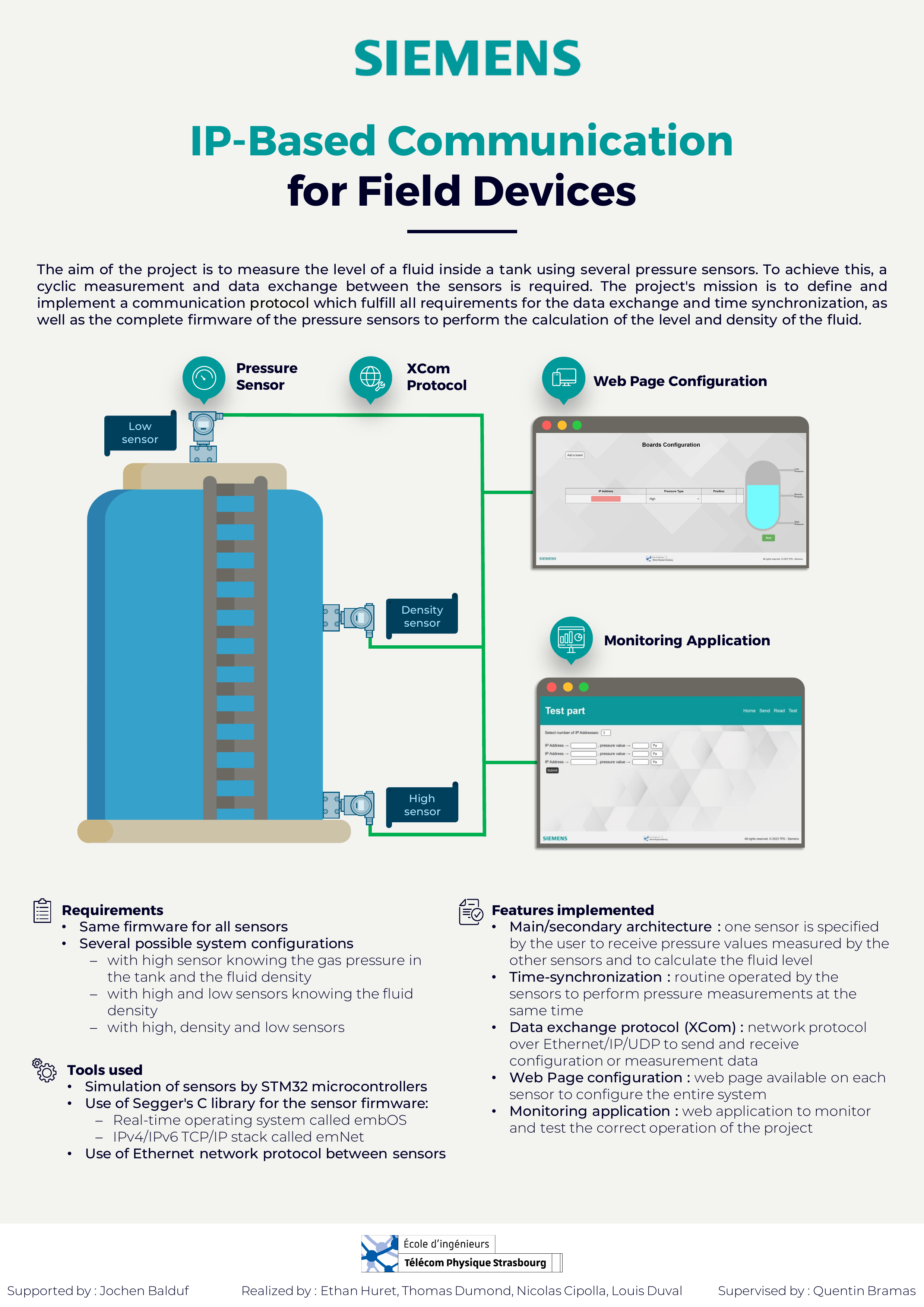
IP-Based Communication for Field Devices
Introduction
This project is an engineering project conducted in collaboration with Siemens, as part of the curriculum at Télécom Physique Strasbourg. The goal is to determine with precision the level and density of a fluid in a tank using several pressure sensors communicating over an IP network.
The project covers the full stack of an embedded industrial system:
- Firmware development for STM32 microcontrollers
- A custom lightweight data protocol (XCom) over Ethernet/IP/UDP
- Time synchronization between sensors
- A web-based configuration wizard
- A monitoring web application
Context
Siemens develops a wide range of pressure measurement sensors. Traditionally, differential pressure sensors with diaphragm seals are used to measure fluid levels in tanks — but this approach is sensitive to external factors like solar radiation or pipe clogging.
This project proposes a new approach: replacing a single differential pressure sensor with multiple absolute pressure sensors communicating over IP, and computing the fluid level and density from their individual measurements.
Physics Background
The fluid level is derived from the hydrostatic law. Up to 3 sensors can be placed on the tank, each at a specific position: PH (High pressure, at the bottom), PD (Density pressure, in the middle) and PL (Low pressure, at the top). Depending on how many sensors are deployed, different configurations are supported:
- 1 sensor (PH) — requires known gas pressure and fluid density
- 2 sensors (PH + PL or PH + PD) — requires known fluid density
- 3 sensors (PH + PD + PL) — fully self-sufficient, can measure both level and density
Architecture
The system is based on a main/secondary architecture. One sensor board is designated as the main device by the user; it collects pressure values from all secondary boards, performs the level and density calculations, and serves as the configuration entry point.
Each board runs the same firmware image, differentiated only by its role (main or secondary), which is set during the configuration phase. IP addresses are assigned dynamically via DHCP, and MAC addresses are selected using hardware jumpers on the board.
[ Secondary Board ]──┐
                     ├──(XCom/UDP/IP/Ethernet)──[ Main Board ] ──> Level & Density
[ Secondary Board ]──┘
Requirements
- Same firmware for all sensor boards
- Support for 3 system configurations:
- High sensor only (with known gas pressure and fluid density)
- High + Low sensors (with known fluid density)
- High + Density + Low sensors (fully autonomous)
- Synchronized pressure measurement cycles across all boards
- No external non-volatile memory used
- Sensor hardware simulated using STM32 eval boards (no real pressure sensors available)
Technologies Used
| Component | Role |
|---|---|
| STM32F429ZI eval-board | Simulates pressure sensors (MCU) |
| Segger embOS | Pre-emptive RTOS for firmware |
| Segger emNet | IPv4/IPv6 TCP/IP stack |
| Segger Embedded Studio | IDE for programming and flashing |
| Ethernet / IP / UDP | Network transport layer |
| Python | Monitoring web application |
Features Implemented
Main/Secondary Architecture
One board is designated as the main device. It receives pressure values from secondary boards, computes the fluid level and density, and distributes configuration to the whole system.
Time Synchronization
To ensure all sensors measure pressure simultaneously, a two-step synchronization protocol is used:
- Latency measurement — the main board sends a ping-pong packet (
XCOM_TS_Cycle_Packet) to each secondary board and measures round-trip time. - Clock alignment — the main board computes an offset based on the maximum latency and sends a
XCOM_TS_Init_Packetto each board, so all interrupts fire at the same time.
This process is repeated cyclically to compensate for clock drift.
XCom Protocol
XCom is a custom lightweight protocol built from scratch, running over UDP on port 3630. It is designed to be minimal, precisely adapted to the project's needs, and easily extensible.
It defines 4 main packet types:
| Type | Subtypes | Description |
|---|---|---|
| Time Synchronization | Cycle, Init | Latency measurement and clock alignment |
| Configuration | Tank, Fluid, Sensor, Cycle | System setup parameters |
| Pressure | Get, Send | Exchange of individual pressure values |
| Level | Get, Send | Exchange of computed level values |
The protocol is implemented as a C library with encode/decode modules:
// Initialize a pressure packet
int XCom_Init_Pressure(XCom_Frame_t *frame, uint8_t type,
                       uint32_t pressureValue, uint8_t qualityCode);

// Encode a frame into a byte array (network endian)
int XCom_encode(XCom_Frame_t *frame, size_t length, uint8_t *data);

// Decode a byte array into a frame
int XCom_decode(uint8_t *data, size_t length, XCom_Frame_t *frame);
Firmware Architecture
The firmware is structured as 4 concurrent embOS tasks:
- Main Task — handles initialization, configuration reception, XCom decoding via callbacks, and drives the application logic through task events and interrupts.
- IP Task — manages DHCP, MAC address setup, and listens for incoming UDP packets on port 3630. It has the highest priority.
- Webserver Parent Task — waits for TCP connections and spawns child tasks to handle each configuration session.
- Webserver Child Task — serves the configuration wizard pages to the user's browser.
Web Configuration Wizard
A wizard-based web interface is embedded in each board's firmware. The user can access it via any board's IP address to configure the entire system in 4 steps:
- Sensor setup — number of sensors, their roles, IP addresses, and positions on the tank
- Tank parameters — volume, diameter, height
- Fluid parameters — density, gas pressure at the top of the tank
- Communication settings — measurement cycle duration, maximum acceptable packet loss
Once submitted, the board validates the configuration and distributes it to all other boards via XCom.
Monitoring Application
A Python web application with 3 pages to test and monitor the system:
- Send — manually inject a pressure value into a board
- Read — retrieve the current pressure value from a board
- Test — simulate a full measurement cycle, compare the computed level against the expected value
Wireshark Dissector
A custom Wireshark plugin was developed to dissect and display XCom packets in a human-readable format during debugging and validation.
Client & Server Test Applications
Two C programs were developed to simulate a main board (server) or a secondary board (client), allowing isolated testing of the XCom protocol and time synchronization without needing multiple physical boards.
Poster